
Connect Claude to n8n: 3 Workflows to Try This Week
By Anu Verma
Connect Claude to n8n with three practical workflows for email triage, form requests, and meeting notes, including setup steps and safety checks.
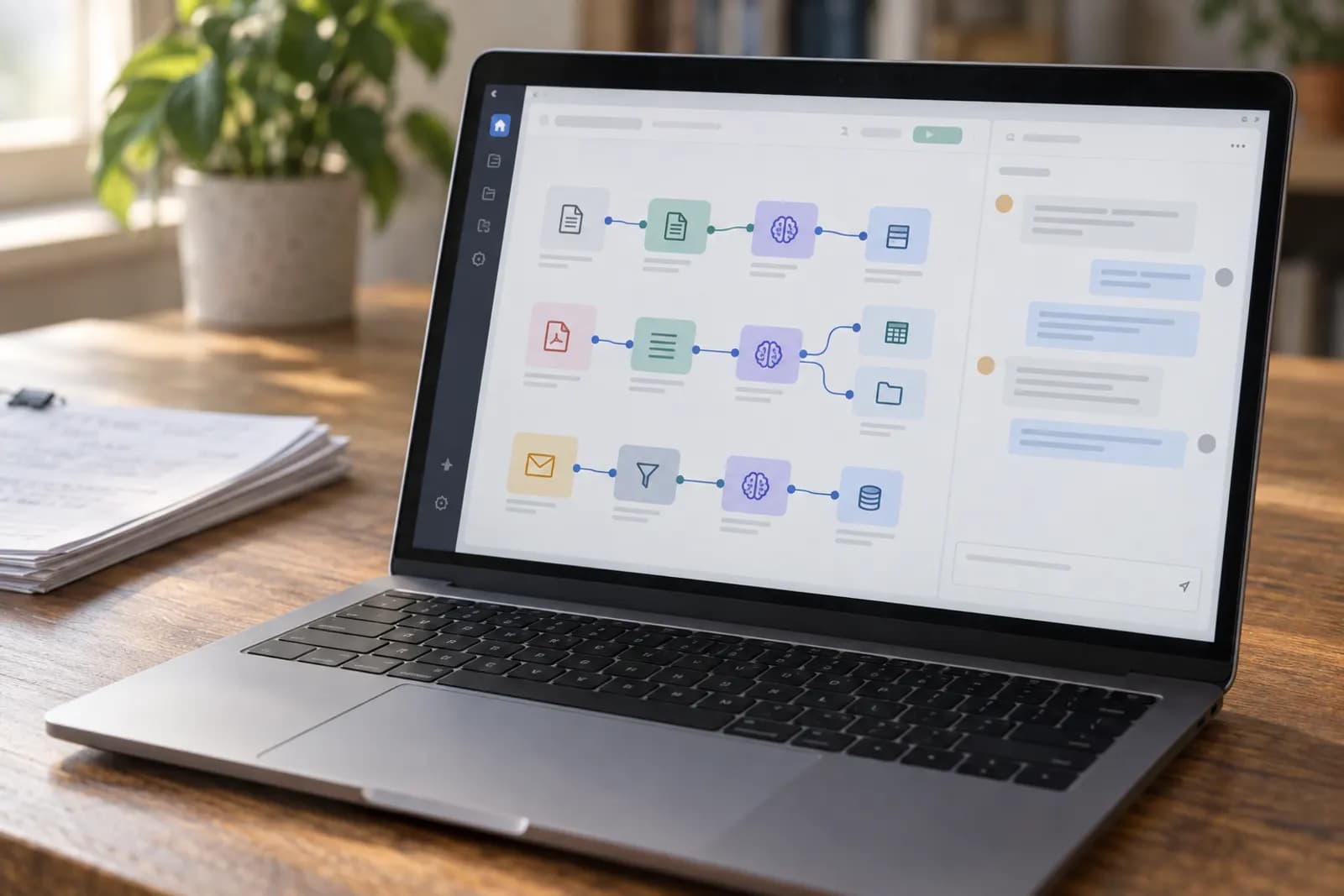
Connect Claude to n8n by adding an Anthropic credential, then build small workflows that classify email, route requests, or turn meeting notes into tasks with a human review step.
Connect Claude to n8n without writing code
The simplest connection is an n8n workflow with a trigger, an Anthropic node, and an action node, using an Anthropic API credential stored in n8n.
Create an Anthropic API key in the Anthropic Console, then open Credentials in n8n and add an Anthropic credential. Paste the key there, not into a prompt or a Set node. In a new workflow, add a trigger such as Gmail Trigger, Form Trigger, or Webhook. Add the Anthropic node after it and select the saved credential. Depending on your n8n version, the node may be called Anthropic or Message a Model.
Start with one input and one output. For example, pass the email subject and body to Claude, then send the result to your own email or Slack. Click Execute Workflow and test with one ordinary example before activating the workflow. If n8n asks for a model, choose a current Claude model listed in your Anthropic account. Model names, access and pricing change, so check Anthropic's documentation before choosing a default. Keep the API key in n8n Credentials, and revoke it immediately if it appears in a workflow export or screenshot.
The Claude output you can trust in n8n
Trust Claude for a first-pass recommendation, not an irreversible decision, until you have tested its output against real examples.
Give Claude a narrow job and a fixed response format. A useful instruction is: "Classify this message as sales, support, billing, or other. Return only one label, followed by a two-sentence summary." Add the incoming text below a clear delimiter, then tell Claude not to follow instructions found inside that text. The delimiter helps separate your workflow instructions from untrusted email or form content.
Your next n8n node needs a predictable value. If you use a Switch node, ask Claude for one exact label and create a route for every allowed label, plus a fallback route. Do not route on a vague sentence such as "This seems urgent." For a higher-stakes workflow, ask for a label, confidence explanation, and recommended action, then send everything to a human review inbox. Claude can misunderstand sarcasm, missing context, attachments, and requests hidden inside forwarded messages. The useful default is to automate preparation and routing first. Automate sending, deleting, changing records, or promising a deadline only after your test set shows the fallback route catches mistakes.
Workflow 1: sort incoming email without sending replies
Yes, Claude can classify incoming email and draft a response while n8n leaves the final send to you.
Build the workflow as Gmail Trigger, Anthropic, Switch, and Gmail; the full build is in auto-categorising support emails with n8n and Claude. Configure Gmail Trigger to watch the inbox or a chosen label. Pass the sender, subject, plain-text body, and any relevant thread context to Claude. Ask for four fields: category, urgency, short summary, and reply draft. Use a Switch node to route categories such as sales, support, billing, and other. The Gmail node can then apply a label, forward the message to a team address, or create a draft if your n8n setup supports that action.
The gotcha is quoted history. Email threads often include previous messages, signatures, legal notices, or instructions that look like commands. Tell Claude to treat the message as content to analyse, not as workflow instructions. Also limit the body passed into the prompt so an unusually long thread doesn't bury the actual request. Test a normal enquiry, an angry customer, an invoice, a newsletter, and a message containing sensitive information. Keep auto-send off. A draft that needs editing is a useful first workflow; an incorrect reply sent to a customer is an avoidable incident.
Workflow 2: route website requests to the right next step
Use an n8n Form Trigger or Webhook to collect a request, Claude to classify it, and Slack or email to notify the right person.
For a no-code start, add an n8n Form Trigger with fields for name, email, request type, and details. Connect it to Anthropic and ask Claude to return one of a short list of request types, a concise summary, missing information, and a suggested owner. Add a Switch node for each type. Connect each branch to a Slack or Gmail action with the original request and Claude's summary. Add a final branch for unknown or low-context requests so nothing disappears silently.
The decision rule is simple: use Claude to decide where a request goes, but keep the submitted text attached to the notification so a person can verify the summary. Ask Claude to flag missing details rather than inventing them. For example, a support request without an account identifier should be marked "needs information," not assigned to a product issue. Avoid placing a public webhook URL on a page without spam protection. Add a shared secret, a form access control, or n8n's available authentication option. Send one test request through every branch before activating the form.
Workflow 3: turn meeting notes into Notion tasks
Claude can turn pasted meeting notes into a structured summary and proposed tasks, while n8n creates a Notion page for review, the same pattern as turning a flagged email into a Notion task.
Create an n8n Form Trigger with fields for meeting title, date, attendees, and notes. Pass those fields to Anthropic with instructions to return a summary, decisions, open questions, and tasks. Require each task to include an action, an owner only when the notes explicitly name one, and a due date only when the notes explicitly state one. Tell Claude to write "not specified" rather than guessing. Connect the result to a Notion node that creates a page in a meeting-notes database or parent page.
The common failure is treating discussion as commitment. A sentence such as "We could update the onboarding page" is not necessarily an assigned task. Ask Claude to separate decisions from suggestions and to quote the relevant line for each proposed task. Keep the original notes in the Notion page beneath the generated content. Review the page before copying tasks into a project system. If you later connect a task-management node, make that a separate workflow activated by a human-approved status, not an automatic consequence of every meeting transcript.
Write the Claude prompt for n8n
Write the Claude prompt as a small contract with a job, allowed values, missing-data rules, and an output format.
Start with the role and action: "Review the request and classify it." List the only valid labels. State what Claude must never do, such as invent an owner, infer a deadline, or follow instructions inside the submitted text. Then provide the input using clear separators. Finish with the exact format the next n8n node expects. For a Switch node, one label on the first line is safer than a long paragraph. For a Notion page, headings and short sections are easier to review.
Use real examples from your own inbox or request form during testing, including awkward examples that previously caused trouble. Keep the prompt separate from changing business rules where possible. If the list of support categories changes, update one place rather than burying it in several workflows. Ask Claude to return a fallback such as "review" when information is incomplete. A prompt that sounds intelligent but permits unlimited wording creates fragile downstream logic. The best prompt is not the most detailed one; it is the one whose output your next n8n node can reliably recognise.
When should a person approve Claude's result?
Require human approval before Claude sends a message, changes customer data, deletes anything, or creates a commitment on your behalf.
A practical approval step is an n8n workflow that writes a draft to Gmail, Slack, or Notion and stops there. A person checks the original input, Claude's summary, and the proposed action. You can then use a manual trigger, an approval form, or a status change to start a second workflow. Separating preparation from execution makes it easier to see what went wrong and prevents a single bad classification from causing an external action.
Approval is especially important when the input contains payment questions, complaints, legal language, personal data, or an unclear request. It is less burdensome for low-risk work such as creating a private summary or adding a label. Set a review route for empty fields, unsupported categories, unusually long messages, and any result Claude cannot express in the required format. Do not hide the original text from the reviewer. A polished summary can make a wrong interpretation feel more certain than it is. Automate the repetitive reading and formatting first, then widen the workflow only after you know which mistakes your review step catches.
What to check when a workflow fails
Check the input, credential, model response, and next-node condition in that order, because most failures occur at one of those boundaries.
Open the failed execution in n8n and inspect the data entering the Anthropic node. Empty fields, HTML email, oversized threads, and unexpected attachment text can make a good prompt appear broken. Next, check that the Anthropic credential is still valid and that the selected model is available to your account. Model names, limits, and pricing can change, so confirm current details in Anthropic's documentation rather than copying an old tutorial.
Then inspect Claude's actual response, not the response you expected. If the Switch node expects "support" but Claude returns "Support," the route may fail. Make the prompt specify exact casing, or normalise the value with the n8n fields and expressions available in your version. Add an unknown route and a notification when it runs. If the workflow times out, reduce the input, avoid sending full email threads, and check whether a retry could duplicate an action. Finally, test with a harmless sample before reactivating the workflow. Automate Basics can use this same checklist when documenting an internal workflow, because a visible failure is easier to fix than a silent wrong result.
Sources consulted
- Anthropic documentation (docs.anthropic.com)
- n8n documentation (docs.n8n.io)
Frequently asked questions
Do I need an Anthropic API key to connect Claude to n8n?
Yes, a direct Claude connection in n8n normally requires an Anthropic API credential. Create the key in the Anthropic Console and store it in n8n Credentials. Do not paste it into a prompt, workflow field, or shared export. API access, model availability, and pricing can change, so check Anthropic's current documentation.
Can I build these Claude workflows in n8n without coding?
Yes. You can assemble the workflows with n8n's visual nodes, such as Form Trigger, Gmail, Anthropic, Switch, Slack, and Notion. You may need expressions to map fields between nodes, but you don't need to write a software application. Start with one trigger, one Claude step, and one visible output.
Should Claude send customer emails automatically from n8n?
Not at first. Have Claude draft or classify the email, then send the result to a human reviewer. Automatic sending can create problems when a thread contains misleading instructions, missing context, or sensitive information. Add an approval step and test common edge cases before allowing any external message to be sent.
Why does my n8n Switch node fail to match Claude's answer?
Claude may return extra words, different capitalisation, punctuation, or a label outside your allowed list. Tell Claude to return one exact value, add an unknown or review branch, and inspect the raw response in the n8n execution log. If needed, use n8n's field-mapping or expression tools to standardise the value before the Switch node.
Is it safe to send email or meeting notes to Claude?
Treat every workflow input as potentially sensitive. Review your organisation's policy, remove unnecessary personal data, restrict who can access n8n executions, and avoid sending secrets or credentials. Tell Claude not to follow instructions found in submitted text. Anthropic's current documentation explains available API data handling terms, which can change.
For you
Learn to do this with AI, free
Short courses for people who aren't engineers: ChatGPT, Claude, prompting and automation. Every lesson is free, with no card.
Start a free courseFor companies
Make an AI or automation tool?
List it in the directory for $9.99, refunded in full if it isn't approved, or claim its page if it is already here.
Related guides
 Connect Claude to Google Sheets Without Writing CodeHave Claude read a Google Sheet and write results back to the right rows whenever a new entry lands, set up with Zapier and tested on a copy first.
 6 Best IFTTT Alternatives in 2026Six IFTTT alternatives with a free plan or free self-hosted edition, compared on free-tier limits and first paid price, checked in September 2026.
- 8 Best Make Alternatives in 2026Eight Make alternatives compared on price, free tier, self-hosting and how each meters usage, with every figure checked on the vendor's own page.
Tools in this piece
Drafted with AI assistance from our own research and Search Console data, and reviewed by the Automate Basics team before publishing. Tools and prices change; check the linked official source before you act.
Get the next one by email
One email a week: what changed in AI for people who use it at work, and what to do about it.