
How to Turn a Voice Note Into a LinkedIn Post Automatically (n8n + Claude)
By Anu Verma
Send a voice note and an n8n workflow transcribes it, then hands the text to Claude with a prompt that rewrites it as a LinkedIn post in your style. The finished post lands in a draft you copy in one tap — 30 seconds of talking becomes publish-ready.
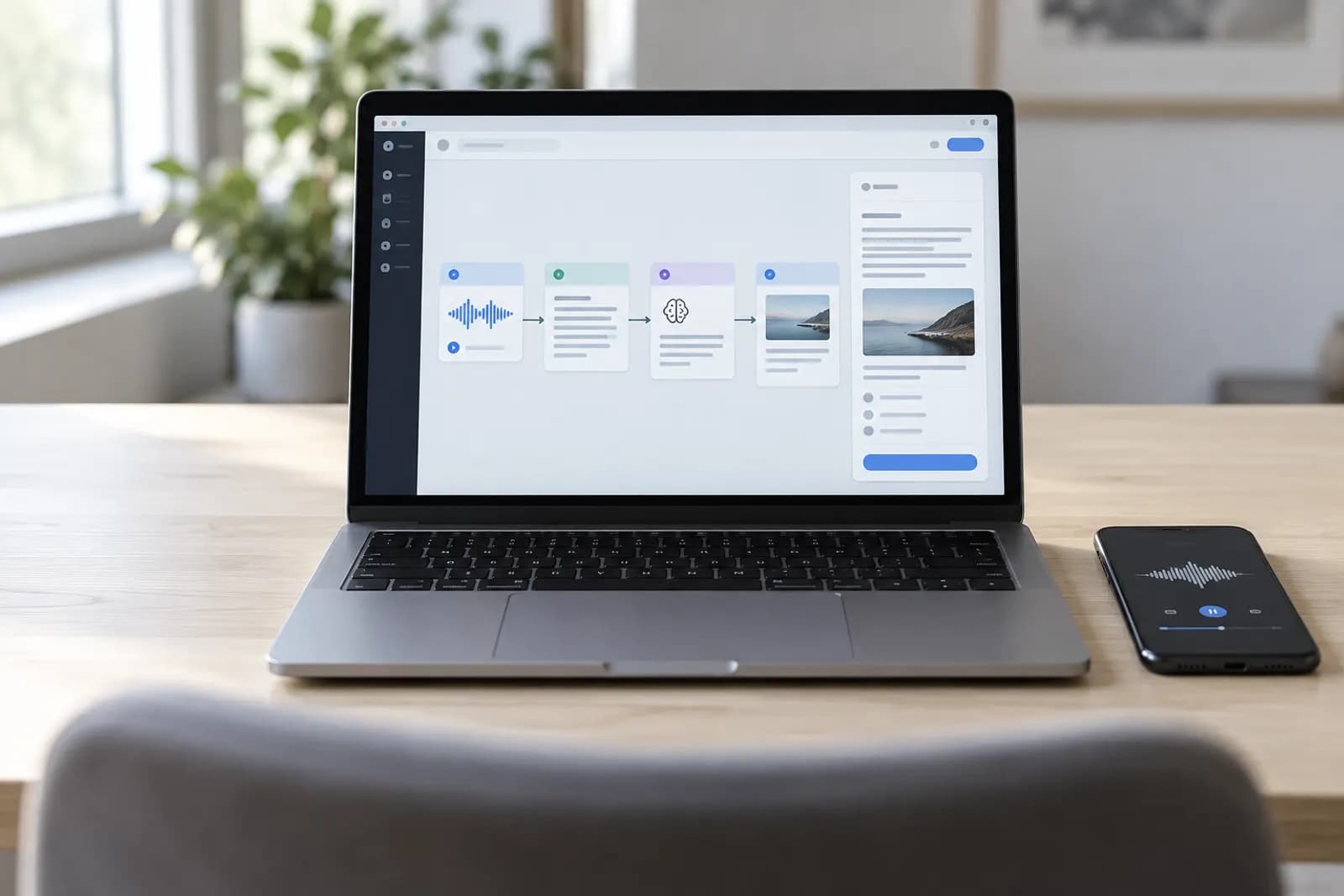
The idea is easy, the typing isn't
Writing a LinkedIn post is a tax on busy people: the idea takes ten seconds, the writing takes thirty minutes. This workflow flips that. You ramble into your phone for half a minute, and a polished post comes back written the way you write — fully automatic, every time, no blank page to stare at. This is the hands-off version; if you're solo, the Apple Shortcuts build is simpler.
Three nodes, fully automatic
The whole workflow is three steps. You send a voice note from a chat app, email, or upload form. n8n transcribes the audio into clean text. Then Claude rewrites that transcript as a LinkedIn post in your voice and drops it where you'll use it. The idea in your head is the only input you ever provide — the machine handles the rest.
What you'll need
Four pieces, and you can set them all up in an afternoon:
- An n8n account — cloud or self-hosted.
- A transcription model — Whisper via the OpenAI API is the easy default.
- A Claude (Anthropic) API key for the writing step.
- A way to send yourself the audio — a chat bot, an email label, or a simple form.
A trigger catches the note
Every n8n workflow starts with a trigger — the event that wakes it up. Add one that fires when a new voice note arrives. A messaging-bot trigger is the smoothest, since you just record and send like any voice message. Prefer email? Use the Gmail Trigger filtered to a label like voice-post. From now on, dropping a voice note into that one place starts the whole machine.
Whisper transcribes it
Add an OpenAI node set to the transcribe / Whisper operation, and pass it the audio file from the trigger. Hit Test step once: you'll watch your spoken words come back as clean, punctuated text. That output becomes the input for the writing step. This is the moment the workflow stops being a recording and becomes something Claude can actually shape, and the same transcription step is the core of transcribing and summarising all your voice notes automatically, not just the ones meant for LinkedIn.
Claude writes the post
Add the Anthropic (Claude) node, connect your API key, and give it a prompt. The examples are the secret — they're what make the post sound like a person, and like you. Never skip them:
You write LinkedIn posts in my voice. Below is a raw, spoken voice note.
Turn it into one LinkedIn post: a strong one-line hook, short punchy lines,
one clear takeaway, no hashtags, no emojis unless they fit naturally.

Match the voice in these examples of my past posts:
--- [paste 2-3 of your real posts here] ---

Voice note transcript:
{{ $json.text }}
Deliver it where you'll grab it
Add one final node to put the post somewhere you'll actually use it. A Gmail node emails it to yourself; a Google Docs node appends it to a running "drafts" doc you skim each morning. Because LinkedIn blocks reliable auto-posting from personal profiles, this copy-paste-then-publish step is the norm anyway — and a three-second human glance before posting is a feature, not a chore.
Flip it to Active
Switch the workflow from draft to Active with the toggle in the top corner. That single switch is the difference between "a thing I built once" and "a thing that runs forever." From now on, every voice note you send quietly becomes a finished post — whether you're at your desk or on a train.
Make it yours
Once the core loop runs, small additions compound fast:
- Multi-platform: add a second Claude node that reshapes the same note into an X thread or a caption — one voice note, a week of content.
- A daily nudge: add a Schedule node that messages you "what did you learn today?" each morning so you actually feed it.
- Hook options: ask Claude for three hooks instead of one, and pick your favorite.
Your first step
Before building anything, open your notes app and paste in two or three of your best past LinkedIn posts. That tiny library is what makes the whole workflow sound human instead of robotic — and you'll drop it straight into the Claude prompt when you reach that step.
Try this now
Record the voice note first — two minutes, one idea, today — and run it through the transcription and draft steps by hand before building the n8n version. The workflow is worth automating once you have posted twice.
Frequently asked questions
Does it post to LinkedIn automatically, or just draft it?
Either. LinkedIn’s API is restrictive for personal profiles, so most people have the workflow drop the finished post into a doc or an email draft for a one-tap copy-paste. If you use a separate scheduler, n8n can hand the post straight to it.
What do I use to transcribe the audio?
Any speech-to-text model works. Whisper (via the OpenAI API) is the common choice — a few cents per note — and there’s a dedicated n8n node for it. You send the audio file, you get text back, and that text flows into the next step.
Can I use ChatGPT instead of Claude?
Yes. Swap the Anthropic node for the OpenAI node and keep the same prompt. Claude tends to hold a personal writing voice well across longer posts, but both work — use whichever account you already have.
How do I make it sound like me and not like AI?
Paste two or three of your own past posts into the prompt as examples and tell Claude to match that voice. The model copies your rhythm, sentence length, and phrasing far better from examples than from instructions like "sound casual."
For you
Learn to do this with AI, free
Short courses for people who aren't engineers: ChatGPT, Claude, prompting and automation. Every lesson is free, with no card.
Start a free courseFor companies
Make an AI or automation tool?
List it in the directory for $9.99, refunded in full if it isn't approved, or claim its page if it is already here.
Related guides
 Voice Note → LinkedIn Post with Apple Shortcuts + ChatGPT (No Install, No Server)Turn a 30-second voice note into a LinkedIn post on your iPhone or Mac: a free Apple Shortcut transcribes it and AI rewrites it. Nothing to install.
 Auto-Post Your Blog to Social With n8n + ClaudeShare every new post without thinking about it: n8n watches your RSS feed, Claude writes an on-brand caption, and it queues to your social channels.
 Extract PDF Invoice Data Into a Spreadsheet Automatically (No Typing)One invoice: paste the PDF into ChatGPT or Claude. Every week: an n8n, Make or Power Automate flow fills Excel or Sheets. Then check totals and tax.
Tools in this piece

Get the next one by email
One email a week: what changed in AI for people who use it at work, and what to do about it.