
How to Automate Invoice Reminders for Freelancers (n8n + Gmail + Sheets)
By Anu Verma
Keep invoices in a Google Sheet with a due date and a paid/unpaid status. An n8n workflow checks it daily, finds the overdue ones, and emails the client a polite reminder that escalates in tone the longer it goes unpaid, stopping the second you mark it paid. You get paid faster and never send the awkward email yourself.
Late payments are a quiet tax
For freelancers, the worst part of a late invoice isn't only the cash-flow hit. It's the mental load of remembering who owes you and the genuine discomfort of asking again. So you put it off, and the invoice ages. This n8n workflow takes the whole job off your plate: it watches your invoices, chases the late ones politely and on time, then goes silent the second you're paid.
A spreadsheet is enough
You don't need accounting software to start. A single Google Sheet is your source of truth, one row per invoice, with these columns:
- Client name and client email, who to chase.
- Amount and due date, how much and when it was due.
- Status, either
unpaidorpaid, the on/off switch.
Move to Stripe or Xero later and you swap this one node, keeping everything else.
Check on a schedule
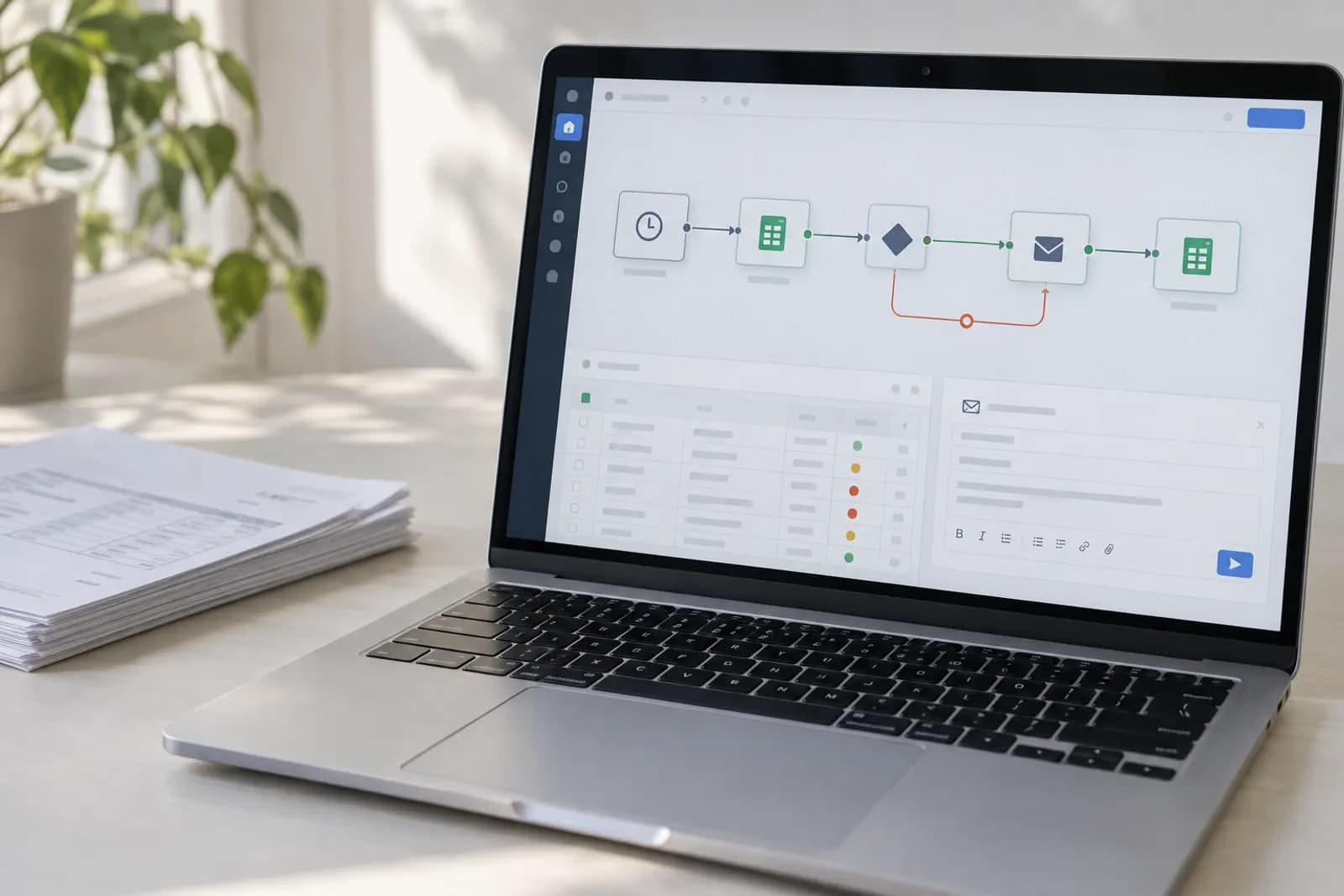
Add a Schedule Trigger set to run once a day, the same daily check that drives automatically drafted sales follow-ups. Each morning it quietly reviews who's overdue, so you never have to carry that list in your head again. This daily, multi-app automation is what makes it an Intermediate build rather than something you'd do in a chat window: n8n is doing real work on a timer while you sleep.
Read the sheet, find the late ones
Add a Google Sheets node (Get Rows) to pull every invoice into the workflow. Then add a Filter node that keeps only rows where status is "unpaid" and the due date is in the past. Everything that survives the filter is, by definition, an invoice that needs a nudge today, no judgment calls needed, just the date and the status doing the sorting.
Escalate by how late it is
People respond to tone, and tone should track how overdue a payment is. Add a Switch node that branches on days past due, so a slightly late client gets a gentle tap while a long-overdue one gets a firm final notice.
- 3+ days: a friendly "just a heads-up."
- 14+ days: a firmer "this is now overdue."
- 30+ days: a final notice referencing your terms.
Write once, or let Claude personalize
Write the three messages once and the workflow reuses them forever. Prefer each reminder to feel personal? Add a Claude node that takes the client name and overdue amount and writes the note in your tone instead of fixed text. Either way, automated reminders read as more professional, not colder, because they're consistent and always on time, which is exactly how clients expect a real business to behave.
Stop the second they pay
Add a Gmail node (Send) on each branch, mapping the client's email and the matching message. The reminder goes out on its own, on time, untouched by you. When a client pays, just mark that row "paid" in the sheet. It instantly drops out of the overdue filter, so the chasing stops automatically and nobody gets a reminder for a bill they already settled.
Set up the sheet and daily check
Make your invoice sheet with the five columns above and add one overdue test row. In n8n, wire the Schedule Trigger, the Sheets Get Rows node, and the Filter, then run it by hand to confirm your test invoice comes through. Add the Switch and Gmail nodes next, and your late payments start chasing themselves.
Try this now
Open your invoice sheet and add the two columns the workflow needs: due date and status. That is step zero and it takes five minutes — the reminders can only ever be as reliable as that sheet.
Frequently asked questions
Do I need accounting software for this?
No. A Google Sheet with columns for client, amount, due date, and status is enough to start. If you already use Stripe, QuickBooks, or Xero, n8n can read invoice status directly from them instead of the sheet, but the sheet version works today.
Won’t automated reminders feel cold to clients?
They feel more professional, not less, consistent, on-time, and politely worded. You can have Claude soften or personalize each message, and most clients simply appreciate the nudge. You set the tone; the automation just makes sure it actually happens.
How does it know when to escalate?
The workflow checks how many days past due each invoice is and picks the matching message, a gentle note at 3 days, a firmer one at 14, a final notice at 30. It’s just a rule based on the date, and you write the wording.
Will it stop emailing once an invoice is paid?
Yes. As soon as you mark the invoice paid in the sheet (or it clears in Stripe), it drops out of the "overdue" filter and no more reminders are sent.
For you
Learn to do this with AI, free
Short courses for people who aren't engineers: ChatGPT, Claude, prompting and automation. Every lesson is free, with no card.
Start a free courseFor companies
Make an AI or automation tool?
List it in the directory for $9.99, refunded in full if it isn't approved, or claim its page if it is already here.
Related guides
 Extract PDF Invoice Data Into a Spreadsheet Automatically (No Typing)One invoice: paste the PDF into ChatGPT or Claude. Every week: an n8n, Make or Power Automate flow fills Excel or Sheets. Then check totals and tax.
 How to Automate a Weekly Marketing Report with GA4 + AI (n8n)Get your weekly marketing report written for you: n8n pulls your Google Analytics numbers, Claude summarises them, and the report lands by email.
 Auto-Categorize Your Expenses With AI (Right in Your Spreadsheet)Sort every expense into the right category in one pass: paste your transactions into Claude or ChatGPT with your own category list, then review the doubts.
Tools in this piece
Get the next one by email
One email a week: what changed in AI for people who use it at work, and what to do about it.